This guide is intended to include common troubleshooting steps and solutions for problems encoutered.
If nothing in here helps please don’t hesitate to reach out to the class support (lecturer and/or demonstrators).
- Kubernetes (Rancher) Deployment Issues
- Docker Issues
- When trying to build on a mac see an error that has something to do with osxkeychain
- Invalid Manifest
- Docker build generates an error failed to resolve source metadata with a failed to authorise 401
- Docker login gives an error about storing credentials “pass not initialised” (in WSL or Linux most likely)
- Connectivity Issues
Kubernetes (Rancher) Deployment Issues
No services (Sorry no matching options) when adding an ingress rule
The service has not been created as part of the workload creation. Have a look at the practical where we setup workloads (top of page 4) and make sure you add a Cluster IP networking service on any workload you wish to expose via ingress.
It’s possible but complex to add this after the fact - your best bet would be to delete the workload and re-create it with the networking step included.
Deployment does not meet minimum availability
Please note this is a completely generic error i.e. it is just saying something has happened and we can’t meet your target (you’ve asked for X instances, we can’t provide that).
Clicking into the workload will hopefully provide more detail such as ImagePullBackoff or CrashLoopBackoff and you can also view the logs to see the more specific problem.
CrashLoopBackoff
The container is crashing on startup. You can view the logs within the container that has just failed to hopefully see some output.
Note: a common cause of this is containers built on a Mac/Windows machine with an ARM chip (i.e. Apple Silicon M series) without the –platform flag; it builds for ARM and can’t execute on an x64 chip, see the instructions on Canvas.
ImagePullBackoff
The container image can’t be pulled. Most commonly this is an authentication issue (the credentials for the registry secret are wrong; did you change your password?) or perhaps the image is badly named.
Check gitlab and see what you can find, and re-create the secret if needed.
Docker Issues
When trying to build on a mac see an error that has something to do with osxkeychain
Check your config.json:
cat ~/.docker/config.json
If you see the following entry "credsStore": "osxkeychain"
Change it to
"credStore" : "desktop"
Just use nano to do this:
nano ~/.docker/config and then do Control+X and press Y to save and exit.
Note if this keeps happening then after changing the store try: docker logout to remove any cached Dockerhub credentials.
Invalid Manifest
You can see an error in the container that shows a manifest error and possibly some crazy creation dates similar to the below:
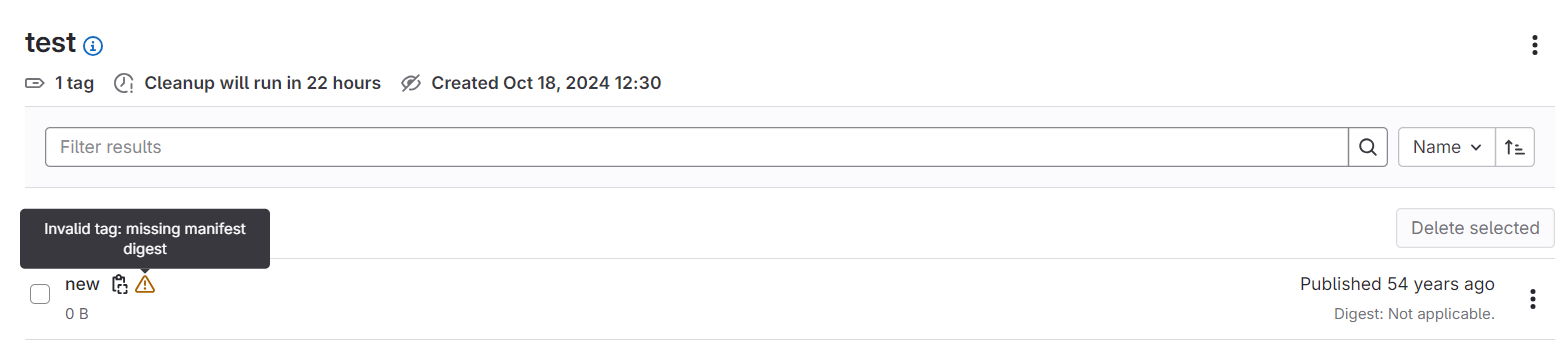
Try building with --provenance false in your build command.
Docker build generates an error failed to resolve source metadata with a failed to authorise 401
You may have a stale connection to Dockerhub. In a terminal run:
docker logout
And try again.
Docker login gives an error about storing credentials “pass not initialised” (in WSL or Linux most likely)
Initialise the pass store: pass init
Connectivity Issues
Connecting to an external service (i.e. cloud hosted DB) times our or fails from QPC
QUB networks block some outgoing connections, for example we regularly see cloud hosted mongoDB connections blocked. You can try a different port, put an external API rather than binary connection in place, or host your DB image locally on the cluster rather than needing an external service.
Connections to my service from the frontend fail with a browser error about CORS (blocked by CORS policy)
CORS is the thing that determines if an API can be called from a web page which has loaded from a different URI host (the origin). So if your frontend loads from frontend.blah.qubcloud.uk and tries to call a service on service.blah.qubcloud.uk unless the service API sets a CORS (Access-Control-Allow-Origin) header then it’ll be blocked.
Your best bet is to have all your services simply allow all origins by setting the header Access-Control-Allow-Origin to *.
My service is definitely setting a CORS header but I’m still getting a CORS blocked error
Go directly to the URL your frontend is calling. Usually this is because the URL results in an error from the ingress proxy (503, 404, etc). The ingress error pages don’t have CORS headers so in the frontend you see it as a block due to CORS, but actually it’s blocked due to an error.